svg
Giving Claude Code the keys to AWS — without giving it the kingdom
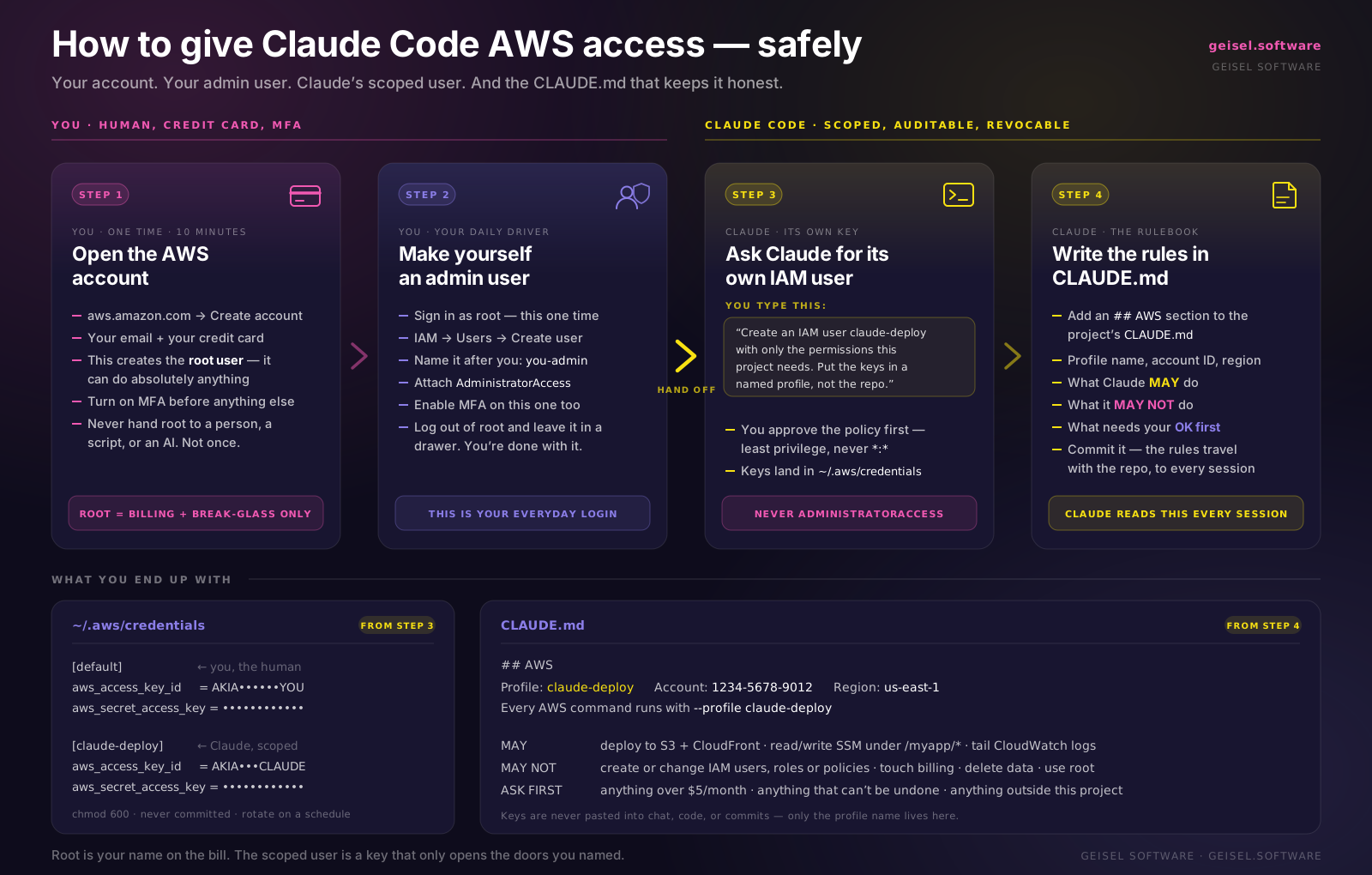
A four-step map of how to set up AWS for yourself and then hand a scoped slice of it to Claude Code. You open the account and create your own admin user; Claude gets a separate IAM user with only the permissions your project actually needs, plus a CLAUDE.md rulebook spelling out what it may do, may not do, and must ask about first. Written for developers opening their first AWS account who want an agent deploying for them without handing over root.
svg
What it costs to run oneshot.show
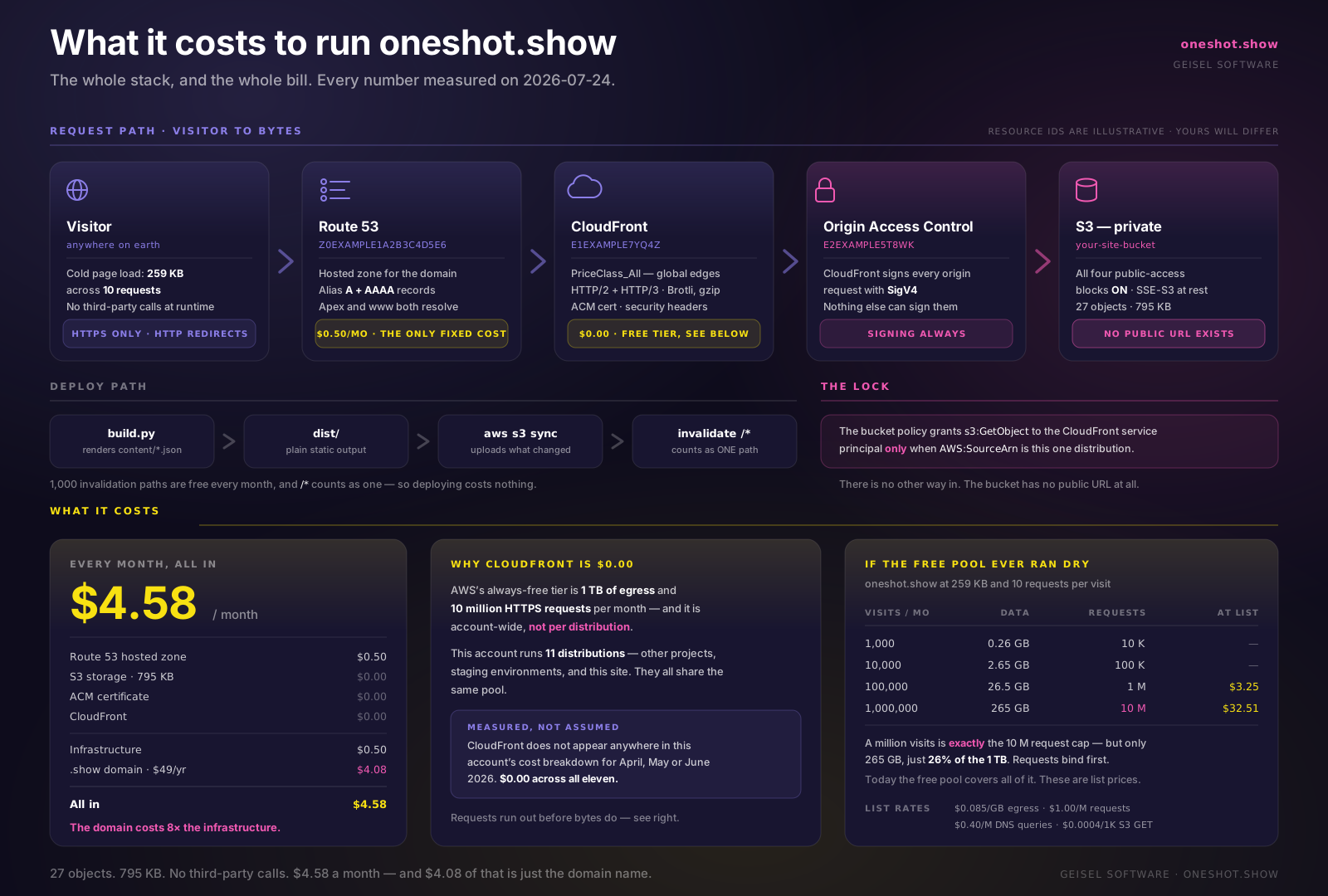
The whole stack and the whole bill on one page. How a request travels from a browser through Route 53 and CloudFront into an S3 bucket that has no public URL, what the deploy path looks like, and what the thing actually costs to keep running. Every number measured on this live site: the infrastructure comes to fifty cents a month, and the domain name costs eight times that.
sh
Claude Code status line
The status line from the video. Model, Claude Code version, working directory, git branch and short hash, a dirty / ahead / clean indicator, and a live context budget that warms from terracotta to yellow to red as you fill the window. Commented, with install instructions in the header.
Read it
#!/usr/bin/env bash
#
# Claude Code status line — model, version, cwd, git state, context budget.
#
# Opus 5 (1M context) v2.1.4 in geisel-forge main (eab45d6) ✓ 84k/1000k
#
# Renders, left to right:
# • model display name (cyan)
# • Claude Code version (grey)
# • current directory basename (blue)
# • git branch + short hash (magenta / yellow) — only inside a repo
# • git state indicator ✗ dirty · ↑ ahead of upstream · ✓ clean
# • context window used / total (colour shifts as you fill it up)
#
# Context colour thresholds: <50% terracotta · 50–89% yellow · 90%+ red.
#
# INSTALL
# 1. Save this file somewhere stable, e.g. ~/.claude/statusline.sh
# 2. chmod +x ~/.claude/statusline.sh
# 3. Add to ~/.claude/settings.json:
#
# "statusLine": {
# "type": "command",
# "command": "~/.claude/statusline.sh"
# }
#
# REQUIRES
# jq, git, and a Nerd Font for the and glyphs.
# No Nerd Font? Swap them for plain text — see the printf at the bottom.
#
# Claude Code pipes a JSON blob in on stdin; everything below reads from it.
input=$(cat)
… 43 more lines in the download
json
settings.json drop-in
The same status line as a single command string, ready to paste straight into ~/.claude/settings.json if you would rather not keep a script on disk. Needs jq, git, and a Nerd Font for the glyphs.
{
  "statusLine": {
    "type": "command",
    "command": "input=$(cat); dir=$(echo \"$input\" | jq -r '.workspace.current_dir'); used_pct=$(echo \"$input\" | jq -r '.context_window.used_percentage // 0'); ctx_size=$(echo \"$input\" | jq -r '.context_window.context_window_size // 200000'); size_k=$(( ctx_size / 1000 )); used_k=$(( used_pct * size_k / 100 )); if [ \"$used_pct\" -ge 90 ] 2>/dev/null; then ctx_color='\\033[38;2;255;50;50m'; elif [ \"$used_pct\" -ge 50 ] 2>/dev/null; then ctx_color='\\033[38;2;255;230;50m'; else ctx_color='\\033[38;2;212;113;78m'; fi; if [ -d \"$dir/.git\" ] || git -C \"$dir\" rev-parse --git-dir >/dev/null 2>&1; then dirty=$(git -C \"$dir\" status --porcelain 2>/dev/null); ahead=$(git -C \"$dir\" rev-list @{u}..HEAD 2>/dev/null | wc -l); if [ -n \"$dirty\" ]; then git_ind='\\033[1;38;2;255;50;50m\u2717\\033[0m'; elif [ \"$ahead\" -gt 0 ]; then git_ind='\\033[1;38;2;255;230;50m\u2191\\033[0m'; else git_ind='\\033[1;38;2;50;255;50m\u2713\\033[0m'; fi; branch=$(git -C \"$dir\" rev-parse --abbrev-ref HEAD 2>/dev/null); hash=$(git -C \"$dir\" rev-parse --short HEAD 2>/dev/null); git_part=$(printf ' \\033[0;35m\ue0a0 %s\\033[0m \\033[0;33m(%s)\\033[0m %b' \"$branch\" \"$hash\" \"$git_ind\"); else git_part=''; fi; printf '\\033[1;36m%s\\033[0m \\033[0;90mv%s\\033[0m \\033[1;32min\\033[0m \\033[1;34m%s\\033[0m%s  %b\udb84\udddb %sk/%sk\\033[0m' \"$(echo \"$input\" | jq -r '.model.display_name')\" \"$(echo \"$input\" | jq -r '.version')\" \"$(basename \"$dir\")\" \"$git_part\" \"$ctx_color\" \"$used_k\" \"$size_k\""
  }
}